IntroSet the promise
Scene-based screen video for Mac
Direct attention.
Record beautifully.
Turn short screen recordings into one polished story. Arrange scenes, focus the viewer, add captions and your visual style, then export—without uploading a frame.
- Multi-scene projects
- Local-only workflow
- One purchase
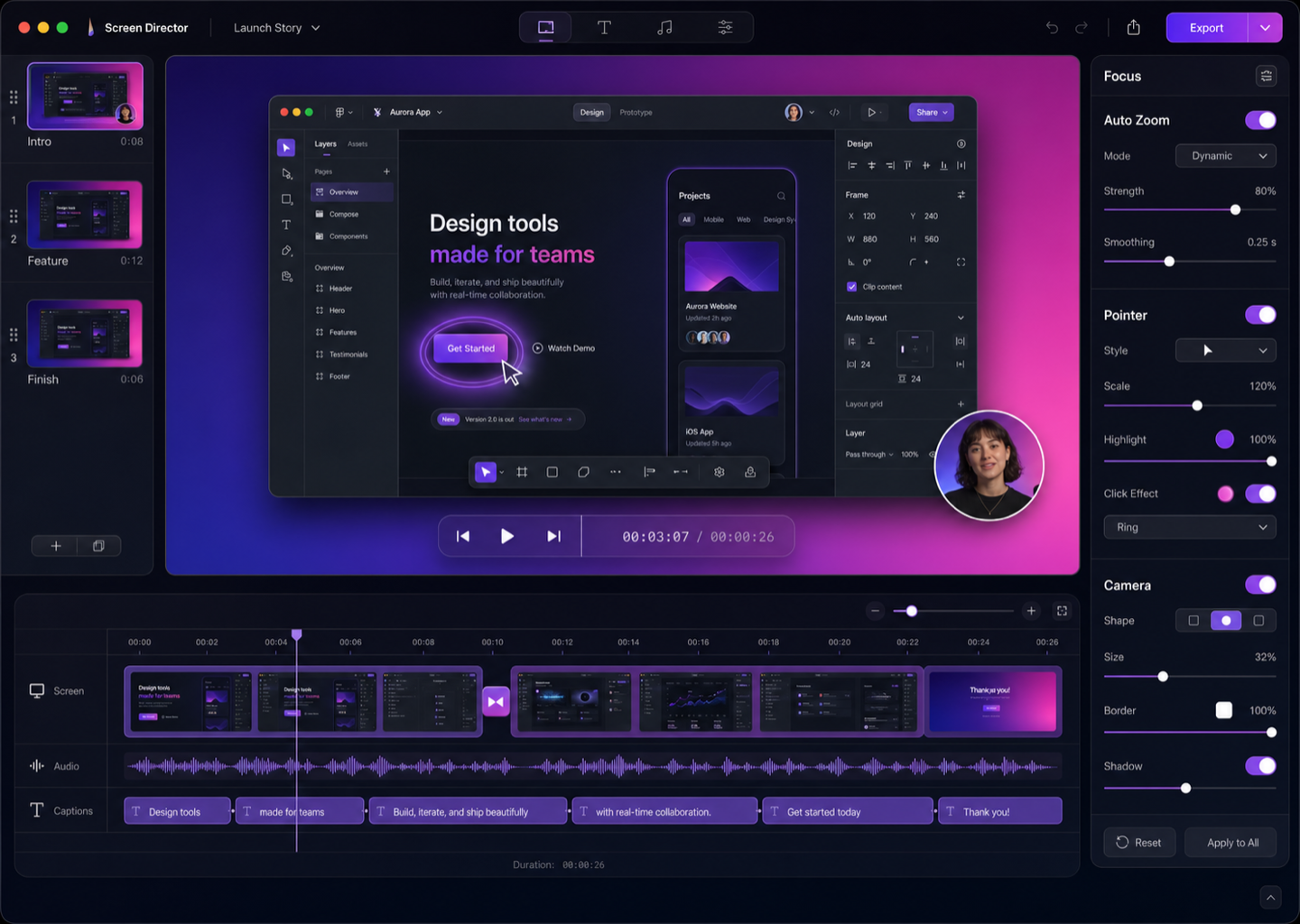
Record, direct, publish
A better screen video starts with a better flow.
- 01
Record short takes
Capture a display, window, or region with separate system audio, microphone, and optional webcam tracks.
- 02
Direct the story
Arrange scenes, refine zooms and pointer motion, shape captions, and apply one consistent style.
- 03
Publish beautifully
Export an SDR Rec.709 MP4 at 1080p or 4K, ready for your site, course, launch, or update.
Built around scenes
One video. As many clear moments as the story needs.
Record the hook, explanation, feature, and finish separately. Reorder or replace a take without dismantling everything around it.
FeatureDirect the viewer
FinishLand the message
Attention, designed
Polish the moments viewers actually notice.
Focus
Automatic zoom suggestions you remain in control of.
Clicks, dwell, and pointer movement suggest meaningful focus beats. Every zoom stays editable.
1.4×
Pointer
Smooth, visible, intentional.
Replace the captured pointer, tune its size, add click rings, or let it fade when inactive.
Captions
On-device words, shaped by you.
Edit timing, line breaks, placement, and emphasis. Unsupported languages never fall back to cloud recognition.
Camera
Your presence, composed.
Position and style a separate 1080p webcam track without baking it into the screen recording.
Branding
A reusable visual system for every video.
Save backgrounds, canvas inset, crop, corners, shadow, pointer, and caption styling as a preset.
Export
The preview is the export.
The same native frame renderer powers both. Choose H.264 or HEVC, 1080p or 4K, and 30 or 60 fps.
16:99:161:14:3
Local by design
Your screen recordings do not need a cloud.
Screen Director has no account, analytics, hosted links, or cloud dependency. Projects, recordings, captions, and exports stay on your Mac unless you move them yourself.
Read the privacy policyMade for modern Macs
Native on Apple silicon.
Requires macOS 15 or later. Liquid Glass controls appear on macOS 26+, with carefully matched native materials on macOS 15–25.
Simple pricing
US$49.99
One purchase. No subscription. No account.
In development for the Mac App Store
Final availability and localized pricing will be shown by Apple.
Questions, answered
What to know before you record.
Does Screen Director upload my recordings?
No. Version 1 has no account, analytics, hosted-link service, or cloud dependency.
Which Macs are supported?
Apple-silicon Macs running macOS 15 or later.
Can I import arbitrary video files?
Not in version 1. The first release focuses on recordings created inside Screen Director.
Are captions generated on device?
Yes, when the selected language is supported by your active macOS version. Screen Director never silently falls back to cloud transcription.
Is this a subscription?
No. The planned US price is $49.99 as one paid-upfront Mac App Store purchase.